Hewlett Packard 2500 and 3500 printer.
If you want an entry-level wide format color inkjet printer (and thus prefer to spare the cost and learning-curve of a RIP), you can opt for the Hewlett-Packard DesignJet 2500CP and 3500CP.
Most expensive wide format printers require a separate RIP, which adds up to $4,000 to the cost of the overall system. But you can avoid this cost because the 2500 CP (36 inches wide) and the 3500CP (54 inches wide) have a built-in mini-RIP already on board.
The 600 dpi print quality of the new Hewlett-Packard color inkjet printers is certainly better than 300 dpi that I got from my old Encad. The construction of the printer is solid, as you would expect from Hewlett-Packard. But how about speed? Speed is admittedly rather slow, but after all, you have saved $4,000. Besides, you don't have to worry about installing and learning how to use a RIP (the RIP is already installed and operates silently in the background). Just press the PRINT button.
The HP DesignJets 2500CP and 3500CP are fully functional without an external RIP (a print server). Since such a RIP costs anywhere from $3500 on up to almost $5,000, many people have decided to chose HP rather than go with another printer (which also would have required a RIP).
Last year it was possible to try out a Hewlett-Packard 3500. It took about an hour to RIP and print a picture at 600 dpi (consisted of three panorama images, each circa 180 dpi original file size, printed from a Macintosh). If you use a file of more modest proportions, say 120 dpi (which is more than enough for this capable printer) then you can speed up the RIP time. The actual time the HP takes to print (after the RIP has rasterized the image) is about the same time any other printer takes. So the printer itself is not slow, just that to save $4,000 you have to allow the printer time to process (rasterize) the image.
HP has upgraded its two early models (2500CP and 3500CP) with the considerably improved 2800CP and 3800CP. HP now includes an EFI Fiery X2CP hardware RIP, which is a clear indication that HP is serious about producing a wide format printer that is useful and productive.
If you have such an HP2500 or 3500 printer, you can quickly and easily solve the situation by obtaining an Onyx RIP from Onyx Graphics Corporation. The Onyx PosterShop can RIP your images (to override the supposed onboard HP capability). Also, RIP from a PC. Don't try to RIP directly from your Macintosh. Yes, you can still continue to do all your graphics on your favorite Mac. But then send the image by 100 Base-T Ethernet to a PC loaded with Onyx PosterShop. That makes this PC a print server. Your Mac file will never know it is going through a Windows NT machine (other than it will RIP faster).
If your Mac has enough RAM, and your PC has a fast chip and adequate RAM, then the HP will start to print after a few minutes (based on reports sent to us by a kind HP user, who said to be sure to have your Mac and PC loaded). He also mentioned that if you do get the Fiery X2-W RIP, its basic 64 MB RAM is more than adequate and that extra RAM on the Fiery does not speed things up.
If you want to RIP super fast, try out the PosterJet RIP from DCS Software, DCSsoftware.co.uk. They are coming out with a super-low-cost yet very fast RIP this summer.
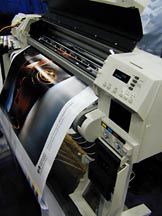 |
Hewlett-Packard 3500 wide format printer. |
Faster, better, solid production quality. The 2800 model prints 36" wide; the model 3800 prints 54" wide.
We liked the quality so much that we ended up obtaining a model 2800CP for our office in Essen, Germany.
This link shows you the colorful results of the Hewlett-Packard DesignJet 2800CP.
If you need help deciding what color printer to buy, send an e-mail to the review editor, Nicholas Hellmuth. Please be sure to mention what kind of images you reproduce, what your market is, your level of experience such as whether you are new to digital printing, and what printers did you consider before reading the reviews on this site.
For additional information and for help making your decision, ask for the "FLAAR report on signs, posters, banners" (specify whether for indoor signs or outdoor signs in the rain and sun) or for the FLAAR report on "Piezo vs Thermal printheads, fact vs fiction, pros and cons of each kind of inkjet printhead."
Most recently updated August 02, 2001.